

Friends & guilds
Gifting
Send a look, a rocket pack or the Lumen Pass to a friend, a guildmate or a party member, and say thanks when one arrives.
Gifting lets you buy something from the Shop for another hero. You pay with your Starshards. The gift lands in their Mailbox, even when they are offline, and you can add a short message. If a gift cannot arrive, nothing is charged.
What you can gift
| Group | What you can gift |
|---|---|
| Style | Outfits, capes and wings, hats, hair, faces, eyes and skin |
| Combat | Weapon skins, damage skins, weapon effects, auras, trails and Shadow colours |
| Pets | Pet Boxes, Mount Whistles, pet looks, mount looks and walk styles |
| Social | Emotes, name tags, chat bubbles, horn banners, chairs and rocket packs |
| Lumen Pass | The season's premium track, for 1,400 Starshards. It unlocks on their account at once |
A look or rocket pack costs its shelf price. Rocket packs sit on the Rockets shelf and inside some looks bundles. Rockets are a show for the whole map, launched from your bag, and give no power. See The Cash Shop for the shelf and the Lumen Pass.
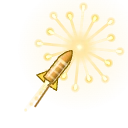 Starburst Rocket
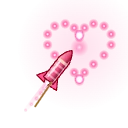 Heart Rocket
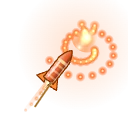 Dragon Rocket
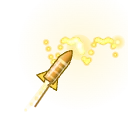 Signature Rocket
Not for gifting:
- Starshards and anything bought with real money. The Lumen Pass premium track is the one exception (Lumen Pass+ is not).
- AUTO-HUNT time, boosts, convenience items and anything with a weekly limit.
- A bundle over 3,000 Starshards. It is too big for the weekly limit, so send its pieces instead.
- A seasonal item once its season is over.
Who can get a gift
- Your friends and your guildmates.
- Heroes you partied with in the last 7 days: you were in a party together on one map, or you cleared a party quest, dungeon, raid or boss lair together. A trade or a duel does not count.
- They do not have to be online.
A gift goes to one hero, the one you pick, and its letter waits in that hero's Mailbox. You cannot send a gift to yourself, to another hero on your own account, or to a hero who has blocked you. A look with its own level, such as the Shadow colours (level 120), can go only to a hero of that level or higher.
Where to start
| Where | What to tap |
|---|---|
| Top of the Shop, on every tab | SEND A GIFT. It opens the Gifts page. On a narrow screen the button shows only the gift jewel |
| An item in the Shop | GIFT, beside BUY, on every item you can gift. Look cards in the Looks tab have it too |
| Shop shelves | A small gift jewel marks what you can gift |
| Friends list | SEND A GIFT on a friend's card |
| Guild roster | SEND A GIFT on a guildmate's card |
| A hero in the world | GIFT on their player card. It is greyed out for someone you cannot gift, and the card says why. On a computer, right-click a hero and choose Send a gift |
The Gifts page in the Shop shows who the gift is for, how many gifts you have left this week, and only things that can be gifted, sorted into All, Style, Combat, Pets and Social. The Lumen Pass leads All. Opened from a person's card, it starts with that hero chosen.
Send a gift
Every GIFT button opens the same gift screen.
- Pick who it is for. The list shows your friends, guildmates and party members, online heroes first. Type a name to search.
- Add a message if you like. It is one line, up to 80 characters, and rude words are filtered.
- Check the price and where the gift arrives.
- Press and hold HOLD TO SEND. It needs a hold, so a stray tap cannot send a gift.
The answer shows right on the screen: "Gift sent to Rin!" or the reason it did not go. When the game knows their look, the screen shows them wearing the gift.
Limits
| What | The limit |
|---|---|
| Your hero | Level 30 or higher |
| Your account | At least 7 days old |
| Each week | Up to 10 gifts or 3,000 Starshards in any 7 days, whichever you reach first |
| Test purchases | Accounts with test purchases cannot send gifts |
The Gifts page and the gift screen show what is left this week, and say why you cannot send yet before you try. Starshards spent on gifts count toward the spend ladder on the Deals page.
When a gift is refused
Nothing is charged, and the screen says why:
- They already own it, or it is waiting in their Mailbox. A bundle counts only when they own every piece. Rocket packs never count: rockets are used up.
- Their Mailbox is full.
- They are below the level the look needs.
- They are not a friend, guildmate or recent party member, or they have blocked you.
- You have reached a limit above.
- The Lumen Pass is between seasons, or a seasonal item has left the shelf.
If a gift cannot be delivered after all, your Starshards come back.
When a gift comes to you
A gift arrives in your Mailbox as "A gift from" the giver's name, even when you are offline. The first time you open it, a YOU RECEIVED A GIFT card shows the gift, who sent it and their message. Tap the gift at the top of the letter to see the card again.
- Looks and rocket packs: press CLAIM in the letter. Outfit pieces, Pet Boxes, Mount Whistles and rockets go to your bag; other looks unlock at once, ready to wear from the Wardrobe.
- The Lumen Pass and emotes: they unlock on your account at once. The letter is only the note.
- It stays: a gift from a hero never expires.
- It is yours: it cannot be traded or gifted again, and shops pay nothing for it.
See  The Mailbox for the Mailbox.
Say thanks
Press SAY THANKS on the card or in the letter. The giver gets a short thank-you letter, once per gift, and a message at once if they are playing. Your button then says THANKS SENT. They can REPLY to your letter like any other. A giver who has turned on Block letters from players sees only the live message.
Tips
Read next
The Cash ShopWhat the Shop sells, what it never sells, and how to get the most out of the free parts.The MailboxWhere gifts, event rewards, guild invites and letters from other heroes arrive, and how to claim them. Parties and FriendsGroup up for faster kills, share EXP fairly, and keep your favorite heroes close.GuildsFound or join a guild, earn marks with your guildmates, and unlock perks that help every member.Lumens and StarshardsEvery kind of money in Lumenfall, how to earn it, and where to spend it.
